Assisted import
Assisted import is the other way to bring an existing business in: instead of fitting your data into the import templates yourself, you send the files as they are and the EyeOnTask team cleans them up and loads them for you.
It sits at the foot of the Import Data page, under Data not in our format?

Settings → Import Data → Assisted import
Send files opens the upload screen.
When to use it
Section titled “When to use it”Use the ordinary import when your data is standard and maps onto the templates without much work — a client list with names, addresses and contacts, an item list with codes and prices.
Use assisted import when it does not:
- the data is a special or unusual type
- your old system’s structure or workflow does not fit the templates
- the files need cleaning before anything could be imported at all
What to send
Section titled “What to send”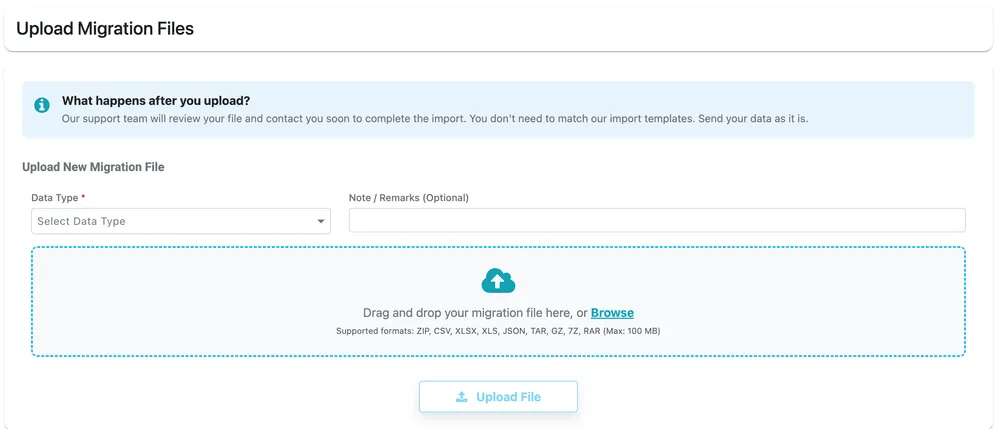
Import Data → Upload Migration Files
Nothing here has to match a template.
| Field | What it is |
|---|---|
| Data Type | What is in the file — Clients, Jobs, Quotation, Inventory, Equipment, Requests, and the other record types. Required. |
| Note / Remarks | Optional. Anything the team should know about the file — which column means what, which records to skip. |
| The file | Drag it onto the box, or Browse for it. |
Supported formats: ZIP, CSV, XLSX, XLS, JSON, TAR, GZ, 7Z and RAR, up to 100 MB.
Upload File sends it.
What happens next
Section titled “What happens next”
Upload Migration Files → Uploaded Migration Files
What you have sent is listed underneath, with its Data Type, the Source Tool it came from, when it was uploaded and your notes.
The support team reviews the file and contacts you to complete the import. That usually takes two to three business days.
Related
Section titled “Related”- Import data — the templates you fill in yourself
- Getting help