Location: the place inside the address
A customer knows where the problem is — the kitchen, the second-floor office, Lift B in Tower 2. They rarely know which machine it is. Location records the place, and the technician finds the machine when they get there.
It is a different thing from the site address: one address can hold a hundred places.
The list of places
Section titled “The list of places”Each site has its own list. Groups — a floor, a tower, a wing — hold the places inside them, and the full name reads Floor 2 · Office.
You build the list as you go, from any Location box: + asks for a group, which is optional, and the name of the place. If something similar is already there, you are told — “Kitchen already exists on Floor 3” — and offered the existing one, so the list does not fill up with four spellings of the same room.
Deleting a place hides it rather than removing it, so jobs that happened there keep their name.
In the portal
Section titled “In the portal”The Where is it? step is off by default on every form. Switch it on per form in the portal settings, where you can also change the question it asks.
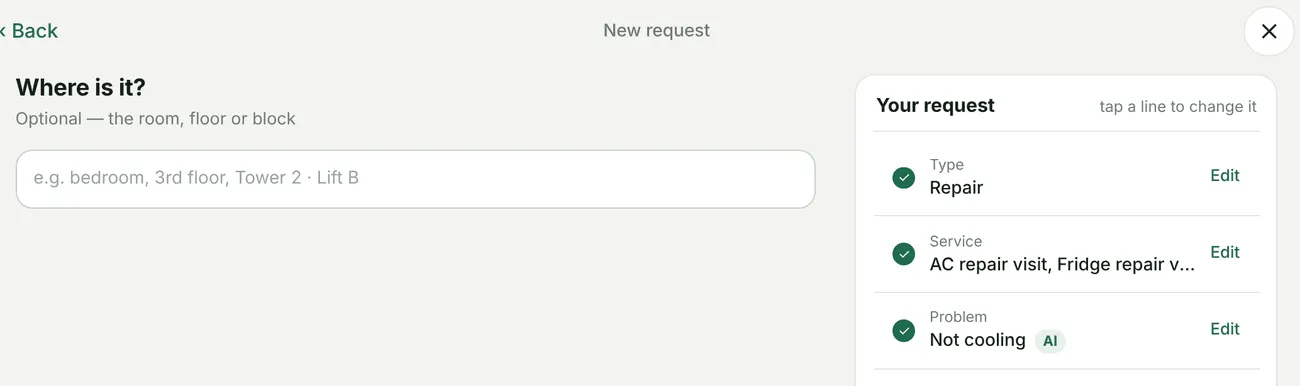
New request → Where is it?
- A signed-in customer gets the site’s places as tiles, plus Somewhere else to type one, and Not sure.
- Where the site has no places yet, or for a guest, it is a text box.
- Starting a request from an equipment card — Report fault, Book a service — records that unit as well.
In the office
Section titled “In the office”| Where | What you get |
|---|---|
| Add / Edit Request | A Location box, once the client and site are chosen. It stays available after a job has been made from the request. |
| The request page | Location : … on the left card — the place picked, or the customer’s own words. |
| Create Job | A Location box under Project/Site. A job made from a request starts with the request’s place. |
| Job overview | A Location dropdown under the address. Changing it saves straight away. |
| Add / Edit Equipment | The unit’s place. It is cleared if the unit moves to another site. |
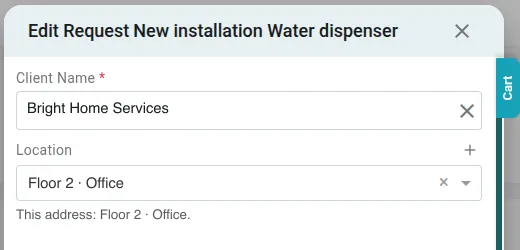
Edit Request → Location
What copies, and what does not
Section titled “What copies, and what does not”- Request → job: the place copies, as long as it belongs to the job’s own site.
- A place the customer typed — Somewhere else, or a guest’s text — shows on the request but does not copy to the job. Somebody in the office picks the real one from the list.
- Changing the job’s place does not change the request’s, or the other way round. They are separate records of the same visit.
- Link Equipment on a job suggests the unit from the equipment card, or else whatever is at that place.
The fieldworker’s app and the job card do not show the location.