Portal requests in the office
A portal request is an ordinary request. It arrives in the same list, and becomes a job, a quote or an invoice the same way. What follows is only what is different about the ones your customers send.
Where they sit in the list
Section titled “Where they sit in the list”Requests that came in today are at the top, and a request from the portal or the website is treated as today’s whatever time it asks to be visited. Somebody who writes in this morning asking for next Tuesday is still at the top this morning, which is when you need to see them.
The request form
Section titled “The request form”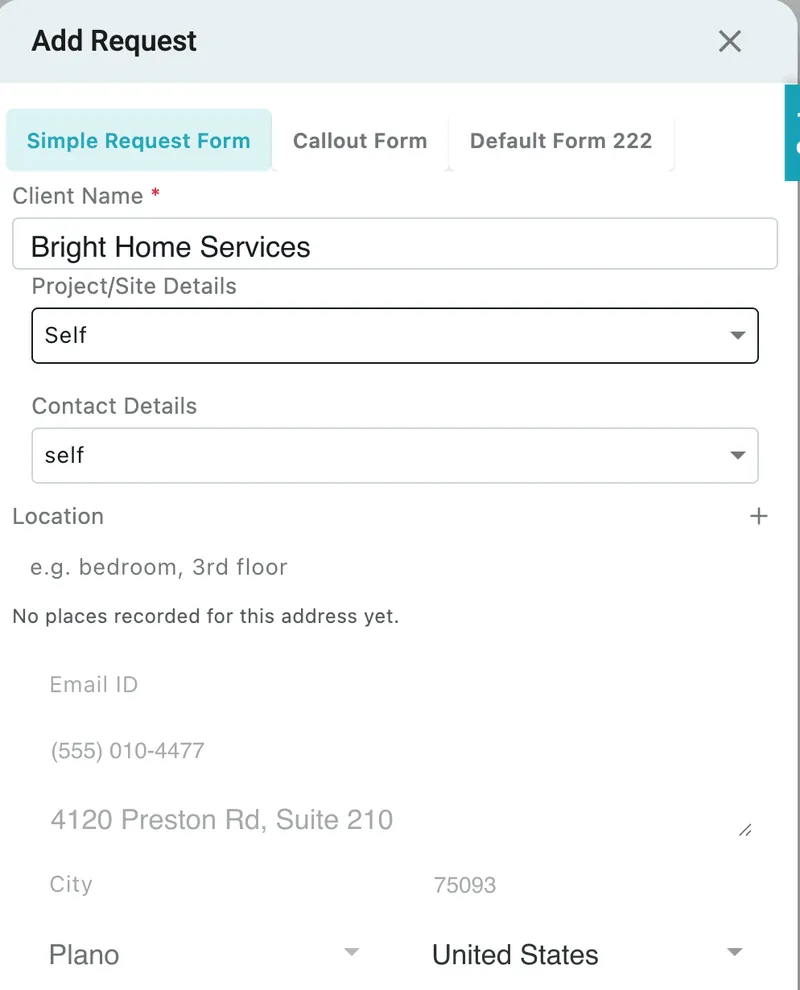
Requests → Add Request
Add and Edit Request are laid out like Add Job — a label above each section: Client Name, Project/Site Details, Contact Details, Location, Contract, Job Type Service, Client’s Preferred time, Reference, Description, and your form’s own questions.
+ beside a label adds a new one of that thing — a job type, a reference, a place — without leaving the form.
Once a job, quote or appointment has been made from a request, the client is locked, but the location can still be changed.
The request page
Section titled “The request page”- The left card carries the site and address, the contact, the contract where there is one, and the location — either the place they picked or the words they typed.
- The cart holds the services and items, the totals, and the advance lines. Where the request is under a contract, a note reminds you the amounts are a guide.
- Booking amount not paid sits at the top while one is outstanding.
Saving the client
Section titled “Saving the client”Add Client on a portal request fills itself in from what the customer typed — company, address, city and ZIP, tax numbers, industry, reference and customer type. You check it rather than type it.
Saving the client is also the moment two other things happen, for an account request or a guest request from the portal:
- the contact is given portal access and sent a Set your password email, once
- any money the guest paid moves into that client’s advance balance