The email Inbox
The mail icon on the Requests screen shows how many emails are waiting. Click it, or Open inbox, to open the Inbox in place of the requests list. Back to requests returns to the list.
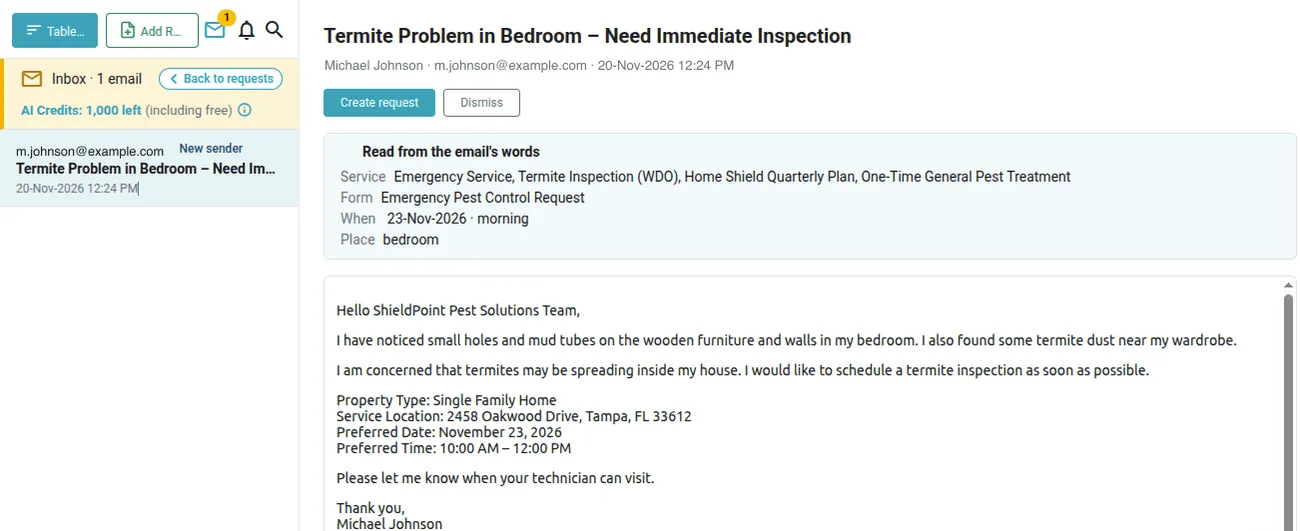
Requests → mail icon → Inbox
Only administrators and owners can use the Inbox. If you cannot see it, ask an administrator.
Nothing becomes a request on its own. Every email waits in the Inbox until someone makes it a request, adds it to one, or dismisses it.
The list
Section titled “The list”Each email in the list shows:
- The sender — the client’s name when the sender’s email address is already one of your contacts; otherwise New sender. If the address is on several clients, it says On N clients.
- The subject, when it came, and the number of attachments.
- reply to REQ-… when the email answers a request you already have — for example, a reply to your email about that request.
Automatic emails — out-of-office replies, newsletters and spam — are kept back from the list.
Previewing an email
Section titled “Previewing an email”Click an email to preview it. The top of the preview shows what was read from it, and how:
- Read from the email’s words — everything was clear from the text itself, with no AI.
- Read by AI — some points were unclear, so AI decided only those.
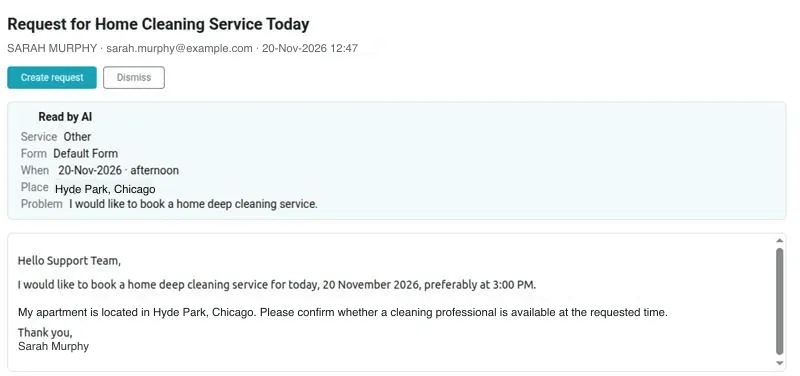
Inbox → an email → preview
What can be read:
| Point | |
|---|---|
| Service | The services the customer asks for |
| Form | The request form the email fits |
| Equipment | One of the client’s units, or a new one, noted as not on file |
| When | The date, and morning, afternoon or evening |
| Place | A room or part of the building |
| Problem | What is wrong |
| Address and Mobile | For a new sender |
If nothing was found, the preview says so, and Create request opens with the email’s text.
How each point turns into a field on the request is in creating a request from an email.
AI Credits
Section titled “AI Credits”The Inbox shows the credits left (“including free”); click the info icon for the details. When credits run out, the Inbox says AI Credits are used up, and the emails stay in the Inbox until you buy more. See AI Credits.